
Rules don't live in a PDF.
They live on the ribbon.
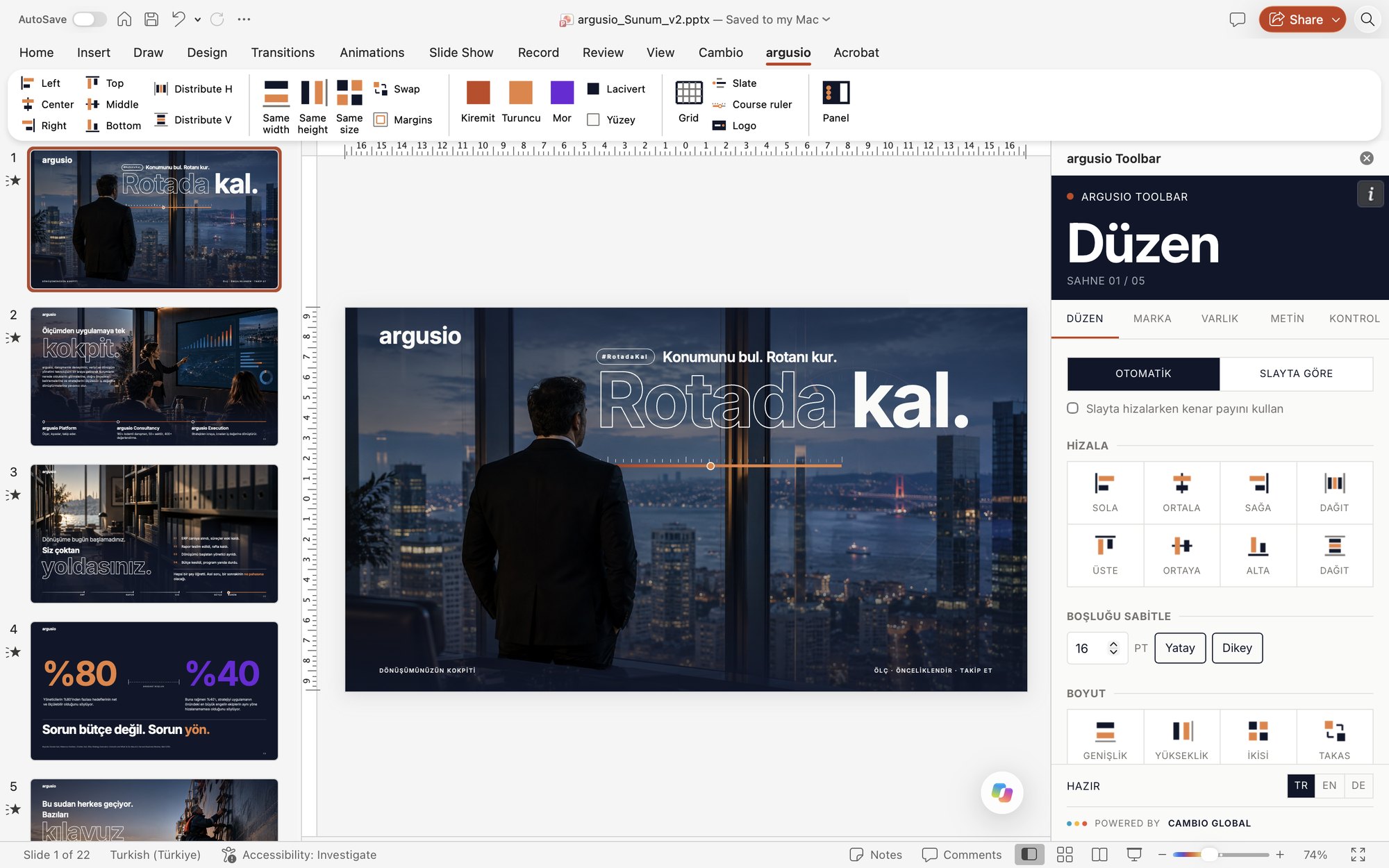
We bring your brand's colours, fonts, logo and rules into PowerPoint with a tab of its own. Whoever builds the deck gets the right colour, the right style and the right layout in one click, and the deck checks itself.
● WHO IT IS FOR
When many people build the decks.
Teams that ship proposals and decks every day and carry the brand's voice into the field.
So the new identity looks right in every deck from day one.
In Istanbul, Berlin or remote: everyone works with the same tool, in their own language.
● INSIDE THE TOOLBAR
Six tools in one tab.
-
Align, distribute, fix the spacing, match sizes, snap to margins, switch on the grid.
-
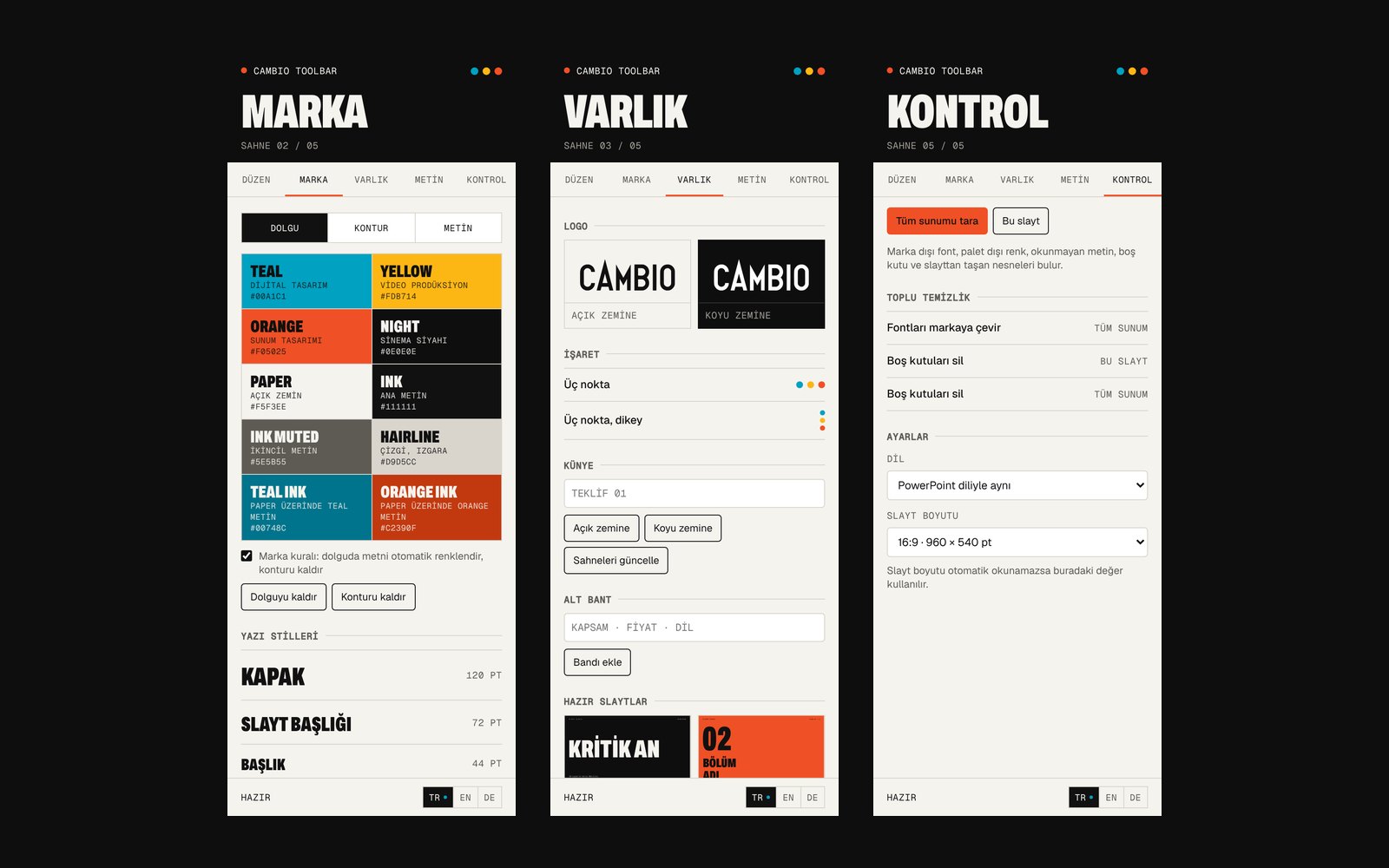
Your colours on the ribbon. On every fill the text colour picks itself for legibility.
-
From cover to slate, every style with its font, weight and size in one click.
-
Vector logo, mark, slate and scene numbers; in the right place, in the right colour.
-
If your brand has a recurring element, it becomes a one-click tool. For argusio it is the course ruler running through the whole deck.
-
Off-brand fonts, off-palette colours, unreadable text, empty boxes, objects bleeding off the slide. Most of it fixed in one click.
● HOW WE BUILD IT
We read your rules
Your brand guide, your template and your team's real decks. That is where we see what breaks most often.
We turn rules into tools
Colour roles, legibility thresholds, type styles, margins. Every sentence in the guide becomes a button or a check.
We turn your signature into a tool
We find the recurring element that makes your brand yours and make it a one-click tool.
We roll it out to your team
Your IT gets a single link and deploys it to everyone at once through Microsoft 365. Updates arrive on their own.
DELIVERY
● REAL WORK
The argusio team builds its decks with a tab of its own today. Cambio's own decks are built with the same tool.
Which PowerPoint versions does it run in?
Current Microsoft 365 PowerPoint: Mac, Windows and PowerPoint Online. Some tools don't work in older versions; updating is enough.
How is it installed for our team?
The cleanest way is for your IT to deploy it to everyone from the Microsoft 365 admin center with a single link. For individual installs we deliver an installation page with steps for Mac and Windows.
Are our presentations sent anywhere?
No. The tools run inside PowerPoint on your own computer; the content of your decks never goes to a server.
Does it work with our corporate fonts?
Yes. If your fonts are installed on the machines, the toolbar uses them and the deck check counts them as brand fonts. For fonts whose licence allows distribution we also prepare an install pack.
Does it have to come with a template system?
No, it works with your existing template too. The strongest result comes from both together: the template carries the layout, the toolbar carries the rules.
Does it run in Google Slides or Keynote?
No, it is PowerPoint-specific. If your team works in another program, we discuss the best route in the brief.